What are AI agents, and why are they not chatbots?
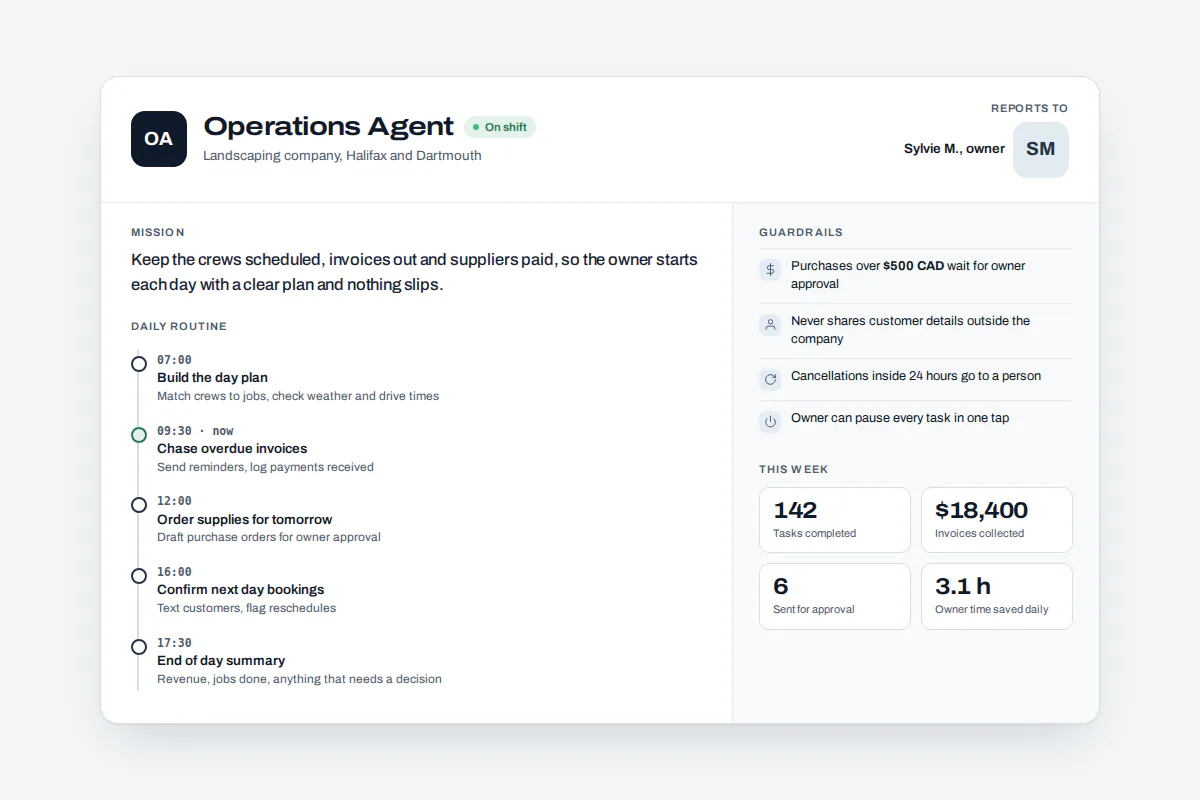
AI agents are software workers that pursue a goal on their own. They decide what needs doing, take action through real channels such as email, texts and your business software, and check the result. A chatbot only answers when someone types. Our AI agents start work on a schedule, hand tasks to each other and stop at limits you set.
A chat window answers questions and then forgets you. It does nothing about the overdue invoice, the unanswered maintenance request or the client report due Friday.
What is revolutionary is not that the AI can talk. It is that our agents start work on their own schedule, finish real tasks, and stop at the limits you set. Every agent gets a one-page charter:
- Role. The job it holds, such as ticket desk or accounts follow-up.
- Mission. The outcome it is measured on, such as no invoice more than 30 days overdue without a reminder.
- Routine. When it wakes: every 15 minutes, weekdays at 7 a.m., or whenever a new ticket arrives.
- Hard limits. What it may never do, how much it may spend, who it must ask and who holds its kill switch.
Together, these agents form an agentic system: a coordinated AI workforce, not a single bot. The same foundation runs every service in our AI for business lineup.
AI agents vs chatbots vs rule-based automation: which do you need?
Use a chatbot to answer common questions on a website. Use rule-based automation to repeat a fixed process with predictable inputs, such as copying invoice data between systems. Use AI agents when the work involves messy requests, judgment and follow-through across several channels, and when you need approvals and a record of every action along the way.
| Question | Chatbot | Rule-based automation bot | EluxAI agents |
|---|---|---|---|
| When does it start work? | When a user types | When a fixed trigger fires | On its own schedule and when something happens |
| Handles messy, unstructured requests | Partly | No | Yes |
| Decides the next step | No, answers only | No, follows a script | Yes, within hard limits |
| Acts in email, texts, calls and business software | Rarely | Fixed steps only | Yes, and chooses the right channel |
| Approval before outbound actions | Not built in | Not typical | Built in for every outbound action |
| Audit log and kill switch | Varies | Basic logs | Both, for every agent |
| Best for | Website FAQs | Stable, repetitive back-office steps | Ongoing operations that need judgment |
Verdict: use a chatbot to answer questions, rule-based automation to repeat a fixed process, and AI agents when the work needs judgment and a paper trail.
Be sceptical of anything that is simply labelled an agent. Gartner estimates only about 130 of the thousands of vendors claiming agentic AI genuinely offer it, a practice it calls agent washing, as this analysis of Gartner's forecasts explains.
How does an AI agent spend its day?
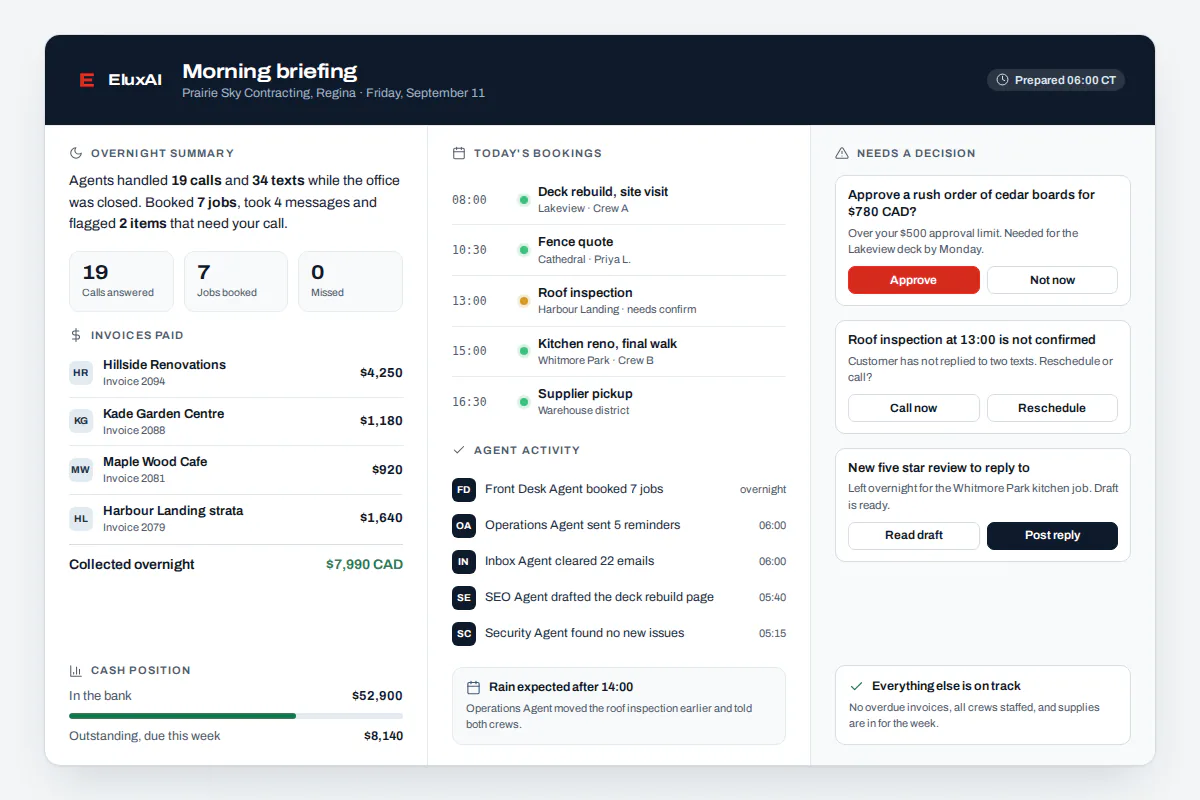
An agent's day follows its routine. It wakes at a set time or when something new arrives, reviews what changed, decides what needs doing, and either acts or hands the task to the agent that owns it. Anything risky waits for approval. Every step goes into the audit log, and a morning briefing tells you what happened overnight.
- Wake. The routine fires, or a new email, text or ticket arrives.
- Review. It reads what changed and checks your company knowledge.
- Decide. It picks the next step within its mission and hard limits.
- Delegate. Work outside its role goes to the agent that owns it.
- Act or ask. Low-risk actions run inside daily caps. Anything that needs a person waits in the approval queue.
- Record. The action, the reason and the result go into the audit log.
- Brief. Each morning you get a short summary of what every agent did and what needs you.
Example scenario, illustrative only: a Halifax property manager, like the fictional roster above, gets maintenance texts at all hours. The on-call agent flags a burst pipe as urgent, texts the tenant and alerts the person on call. Routine requests wait for the 7 a.m. briefing.
What stops an AI agent from going rogue?
Four controls, all built into the platform. Every outbound action can require approval. Every action lands in an audit log you can read. Spending caps limit what each agent may use. One kill switch stops every agent at once. Agencies also get a private workspace for each client, so one client's agents never see another client's data.
The revolutionary part is earned autonomy. Every kind of action starts behind approval and moves up only after a clean record you can read in the audit log. We call it the Autonomy Ladder:
- Observe. The agent reads, summarizes and reports in the morning briefing. No outbound actions.
- Draft. The agent prepares replies, tickets and posts, and a person approves each one.
- Act within caps. Low-risk actions run automatically inside daily limits, and everything else still needs approval.
- Act and report. Trusted routines run end to end and appear in the audit log and briefing.
This is innovation you can inspect. It also mirrors the approach in the Government of Canada's guide on the use of agentic AI. It recommends draft or read-only starts, human checkpoints, a way to pause agents and permanent action logs.
Which AI agents can you put to work first?
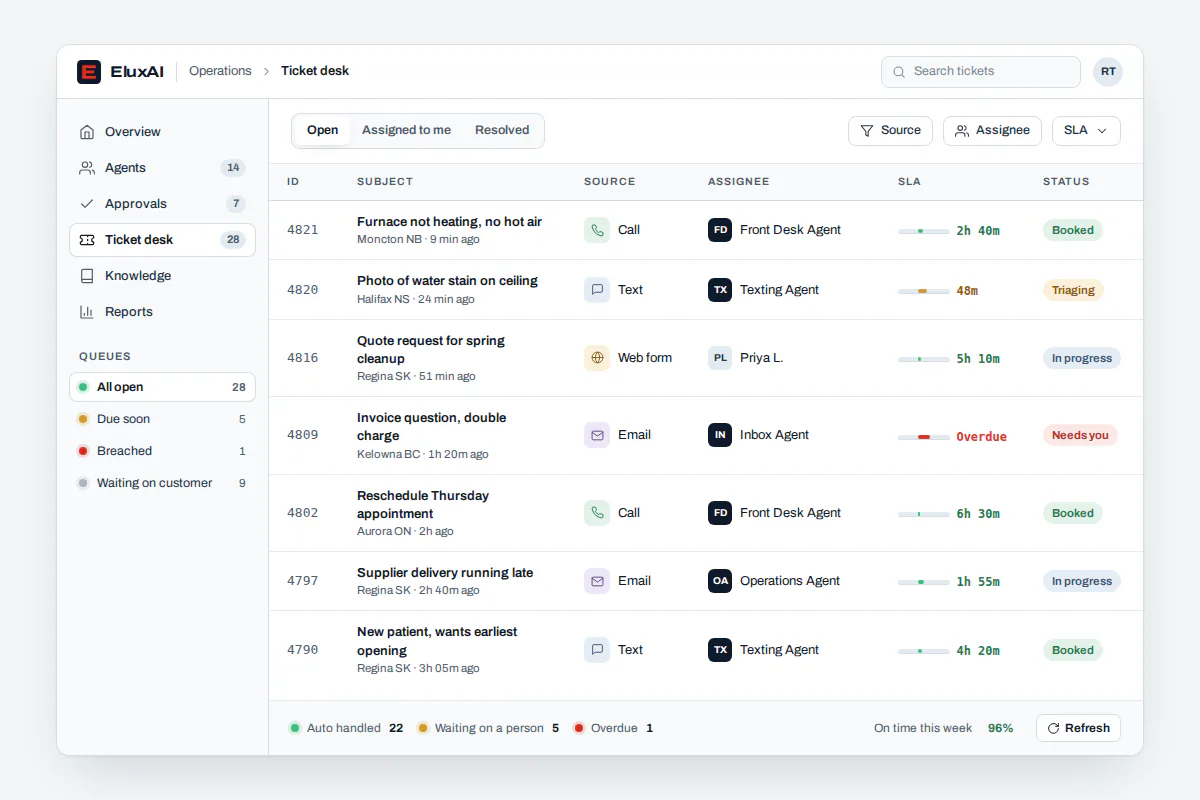
Start with work that repeats, follows clear rules and hurts when it slips. A practical first step is a ticket desk staffed by on-call agents, one inbox for email, texts and social messages, a follow-up agent for invoices or quotes, or away mode, which answers routine questions while you are off and sends a briefing when you return.
- Ticket desk with on-call agents. Every request becomes a ticket, and urgent ones go straight to the person on call.
- One inbox. Email, texts and social messages in one place, with contacts and deal tracking.
- Agents inside your team chat. Ask for a status or approve an action without leaving the chat.
- Away mode. Routine questions answered while you are off, with a briefing on your return.
- Answers from your own documents. Agents answer from a private AI knowledge base instead of guessing.
Calls have a dedicated agent too, and our AI receptionist answers and books them. The AI email assistant works the inbox, and both feed the same ticket desk.
Why do so many agentic AI projects fail?
Most fail on governance, not technology. Gartner predicts over 40% of agentic AI projects will be cancelled by the end of 2027 because of escalating costs, unclear business value or inadequate risk controls. Projects that survive give each agent a narrow mission, a named owner, a spending cap and approvals from day one, then widen autonomy step by step.
Gartner published the forecast in June 2025, as summarized in this review of the prediction. We design around its three failure points:
- Unclear value. Every agent has a mission with an outcome you can measure.
- Escalating costs. Each agent has a spending cap, and you see costs every month.
- Weak risk controls. Approvals, the audit log and the kill switch are on from the first day.
How can SEO agencies, app developers and other businesses use AI agents?
SEO and marketing agencies run each client in a private workspace, with agents handling requests, status updates and reporting reminders. App developers and software studios can use agents inside team chat and tester communities to triage bugs. Trades, clinics, property managers, online stores and franchises can use them for after-hours triage, follow-ups and business process automation.
- SEO agencies. In an illustrative Toronto example, client requests from team chat become tickets, and account managers approve every agent-drafted update.
- App developers and software studios. Beta bug reports become tickets, duplicates are merged and each bug goes to the developer on call.
- Trades and home services. After-hours triage, urgent jobs escalated to a callback and a briefing of overnight work.
- Clinics and professional practices. Routine scheduling and inquiries with strict approval levels.
- E-commerce and franchises. Order questions, returns as tickets, and one charter template reused across locations with separate workspaces.
For an AI automation agency or an in-house team, the result is the same: workflow automation that handles judgment calls, not only fixed rules.
What do Canadian privacy rules mean for AI agents?
Your organization stays accountable for what its agents do with personal information. Canada's privacy regulators state that accountability for decisions rests with the organization, not with any automated system. That is why approvals, audit logs and clear data maps matter. Our platform is local-first, can run its AI models in Canada, and offers data residency options.
The regulators set this out in their principles for generative AI, published in December 2023. Privacy is also on owners' minds: cybersecurity or privacy concerns were the barrier to AI use named most often in 2026, cited by 13.4% of Canadian businesses, according to Statistics Canada.
During the assessment we map every data flow and document it for your privacy lead.
How much do custom AI agents cost in Canada?
Typical Canadian market ranges put a focused small business AI build at about $15,000 to $40,000 after a discovery phase of $2,000 to $5,000, with running costs of a few hundred dollars a month. Broader AI software projects are often quoted from $30,000 to $120,000 or more. These are market ranges. EluxAI quotes after a free assessment.
| Item | Typical market range | Source |
|---|---|---|
| Discovery and scoping, small business | $2,000 to $5,000 | Canadian cost guide, June 2026 |
| Build and tuning, small business | $15,000 to $40,000 | Same guide |
| Running costs, small business | A few hundred dollars per month | Same guide |
| Simple AI software project | $30,000 to $60,000 | Canadian development guide, August 2026 |
| Mid-level AI software project | $60,000 to $120,000+ | Same guide |
| Maintenance and optimization | $1,000 to $6,000+ per month | Same guide |
What moves a quote: how many agents you need, which channels they use, how much work they handle and how many of your systems they connect to. EluxAI quotes after a free assessment, and you can talk to our Canadian team before sharing any access.
Built on NVIDIA: the innovative foundation for an AI workforce
We chose NVIDIA accelerated computing as the foundation for our agentic platform. An agent that wakes every few minutes and hands work to other agents makes many AI requests a day, and every one of them needs to come back fast.
NVIDIA marked 20 years of its accelerated computing platform in 2026, and it reports that its optimized inference software nearly doubled throughput for an 8-billion-parameter open model on a single data centre GPU, from 613 to 1,201 tokens per second. NVIDIA founder and CEO Jensen Huang put the direction plainly at GTC 2026: The enterprise software industry will evolve into specialized agentic platforms.
That is what we are building in Canada. Running on NVIDIA GPUs keeps your agents responsive, and private AI can run on our own NVIDIA-powered hardware instead of a shared public service.